
Guides for what's live — and only what's live.
Our documentation rule is simple: a guide exists only for a capability you can use today. Planned features get a status label on the product pages, never a how-to. Every connection follows the same five steps — the steps our team runs with you at onboarding:
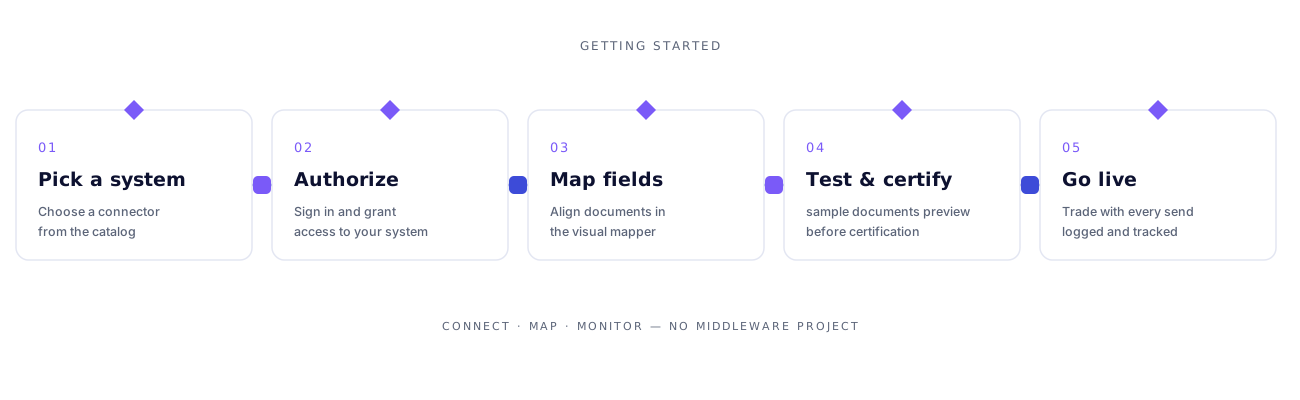
Getting started
Connect your first system end to end: pick it in the catalog, authorize with your own credentials, and watch the connection verify against the real platform.
- Choosing your first connector
- Authorizing a connection (OAuth and API keys)
- Verifying a connection — what the probe actually checks
- Reading the transmission log
EDI guides
Native X12, transaction by transaction and partner by partner. Every guide names the official implementation guide it is built from.
- 850 Purchase Order — receiving your first order
- 940 / 945 — warehouse shipping orders and advice
- 997 acknowledgements — reading acceptance and rejection
- SFTP channels — drops, pickups and store-before-delete
Connector guides
One guide per connector: what it moves, what credentials it needs, and what its limits are. Thirteen connectors have full guides today; the rest are written as each connection is onboarded.
- Shopify, NetSuite, QuickBooks Online, Xero (full guides)
- Amazon SP-API and Walmart Marketplace
- FedEx, UPS and the carrier set
- EDI networks: SPS, TrueCommerce, Rithum, Cleo, B2B Gateway
API & webhooks
For systems that aren't in the catalog yet — and for teams who build on the pipe.
- Flows: triggers, runs and run logs
- Webhooks: inbound endpoints and outbound events
- Your API: connecting a custom REST system through the flow builder
- File-based systems: the SFTP channel as an API of last resort
Full guide texts live in the product documentation library and expand with every onboarding. If a guide you need doesn't exist yet, ask us — guide requests are how the library gets its order.